An AI agent is only as useful as the systems it can reach. A model that writes great emails but cannot see your CRM, check an order or update a ticket ends up as one more tab your team copies and pastes from.
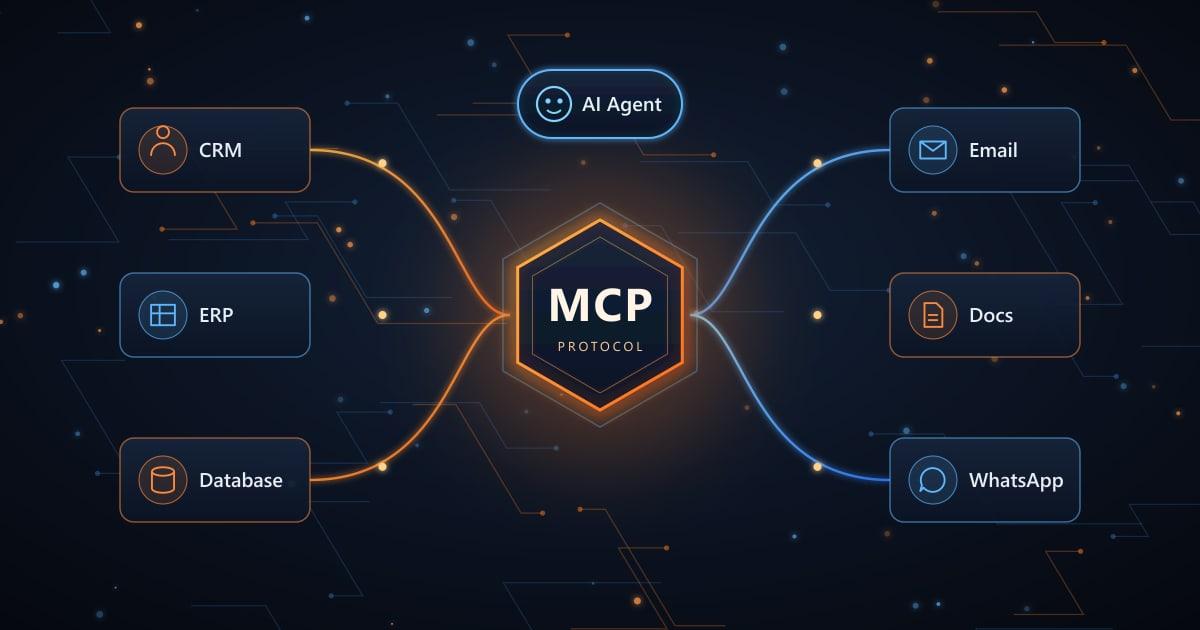
The Model Context Protocol (MCP) fixes this. MCP is an open standard that gives AI agents a single, consistent way to connect to business tools and data: CRMs, ERPs, databases, documents and messaging apps. In 2026 it has become the default way companies wire AI into their operations. This guide explains what MCP is, how it works, where it pays off, and how to roll it out safely.
What Is the Model Context Protocol (MCP)?
MCP is an open protocol that standardises how AI applications talk to external tools and data sources. Anthropic introduced it in November 2024. During 2025, OpenAI, Google and Microsoft added MCP support to their AI products, and in December 2025 MCP was donated to the Agentic AI Foundation under the Linux Foundation, so no single vendor controls it.
A common way to describe MCP is "USB-C for AI". Before USB-C, every device needed its own cable. Before MCP, every AI model needed its own custom integration for every tool. With MCP, you build a connector (an MCP server) once, and any MCP-compatible AI assistant or agent can use it.
How MCP Works: Hosts, Clients and Servers
MCP has three parts:
- Host: the AI application the user works in, such as Claude, ChatGPT, an IDE or your own internal app.
- Client: the component inside the host that keeps a connection to one MCP server.
- Server: a small service that exposes a business system (CRM, database, file store) to AI in a standard format.
[ Sales rep ]
     │ "Summarise Acme Corp and log today's call"
     ▼
[ Host: AI assistant ] ── MCP client ──┬──▶ [ MCP server: CRM ]       → read account, write call log
                                       ├──▶ [ MCP server: Email ]     → fetch last 5 threads
                                       └──▶ [ MCP server: Invoices ]  → check overdue payments
An MCP server can offer three kinds of capabilities:
| Capability | What it is | Business example |
|---|---|---|
| Tools | Actions the AI can call | create_lead, update_ticket, check_stock |
| Resources | Data the AI can read | Product catalogue, policy documents, customer records |
| Prompts | Reusable templates | "Weekly sales summary", "Draft collection reminder" |
Servers run either locally (over standard input/output, good for desktop tools) or remotely over HTTP, which is how most company-wide deployments work. Remote servers use OAuth so each user only reaches the data they are allowed to see.
Why MCP Matters for Business in 2026
Build once, use with any model
Without MCP, connecting three AI tools to five business systems means fifteen custom integrations. With MCP it means five servers. When you switch models or add a new AI tool, the connectors keep working. That reduces both cost and vendor lock-in.
Your software vendors already support it
Many platforms now ship official MCP servers or MCP support, including HubSpot, Salesforce, Stripe, GitHub, Atlassian and Notion. For these, connecting an agent can take hours instead of weeks.
Agents are moving into everyday apps
Gartner predicted that 40% of enterprise applications would include task-specific AI agents by the end of 2026, up from less than 5% in 2025. Those agents need a standard way to reach company data, and MCP is that layer.
Real Business Use Cases for MCP
| Team | MCP connection | What the agent does |
|---|---|---|
| Sales | CRM + email | Summarises an account before a call, logs notes, updates deal stage |
| Support | Helpdesk + order database | Answers "where is my order?", drafts replies, escalates with context |
| Finance | Accounting system | Lists overdue invoices, drafts payment reminders, flags mismatches |
| Operations | Inventory database | Warns about low stock and drafts purchase orders for approval |
| HR | HRMS + policy docs | Answers leave-balance and policy questions for employees |
| Customer channels | WhatsApp + CRM | Lets a WhatsApp agent check orders and book appointments in real time |
The pattern is the same each time: the AI already understands language, and MCP gives it controlled access to the facts and actions it needs.
Build or Buy: Ready-Made vs Custom MCP Servers
Use a ready-made server when your tool is a popular SaaS product with an official MCP server. Review its permissions and connect it.
Build a custom server when your data sits in an in-house system, a legacy database, an accounting package without an official server, or a custom CRM. Custom servers are smaller than most people expect. Here is a simplified example in TypeScript using the official MCP SDK that lets an agent look up a lead's status:
import { McpServer } from "@modelcontextprotocol/server";
import { StdioServerTransport } from "@modelcontextprotocol/server/stdio";
import * as z from "zod/v4";

const server = new McpServer({ name: "crm-leads", version: "1.0.0" });

server.registerTool(
  "get_lead_status",
  {
    description: "Get the current stage and owner of a sales lead by email",
    inputSchema: z.object({ email: z.string().email() }),
  },
  async ({ email }) => {
    const lead = await crm.findLeadByEmail(email); // your existing CRM client
    if (!lead) {
      return { content: [{ type: "text", text: "No lead found for " + email }] };
    }
    return {
      content: [{ type: "text", text: lead.name + " is in stage " + lead.stage + ", owned by " + lead.owner }],
    };
  }
);

await server.connect(new StdioServerTransport());
In production you would host this over HTTP, add authentication and log every call, but the core idea stays this simple: describe the action, validate the input, call your existing system.
MCP Security: The Part Most Teams Skip
Giving AI access to business systems is powerful, and it needs guardrails. Follow these rules:
- Start read-only. Let the agent read data first. Add write actions one at a time once you trust the results.
- Apply least privilege. Each MCP server should only reach the tables, records and actions it needs, using the signed-in user's own permissions through OAuth.
- Require human approval for risky actions. Sending money, deleting records or emailing customers should need a confirmation click.
- Guard against prompt injection. Text inside emails, tickets or web pages can contain hidden instructions. Treat tool output as data, never as commands, and keep sensitive tools separate from tools that read untrusted content.
- Install only trusted servers. Use official or audited servers, pin their versions and review updates, just as you would any other software dependency.
- Log everything. Keep an audit trail of which agent called which tool, with what input, for which user. This also helps with India's DPDP Act obligations.
A 30-Day MCP Rollout Plan
- Week 1: Pick one workflow. Choose a repetitive, high-volume task, such as preparing account summaries before sales calls. Define what "good" looks like.
- Week 2: Connect read-only. Set up the MCP servers for the systems involved, with read access only. Test with a small group.
- Week 3: Add one write action. Allow a single action, such as logging call notes, with human approval turned on.
- Week 4: Measure and expand. Compare time saved and error rates against the old process, then pick the next workflow.
This step-by-step approach keeps risk low and gives you real numbers before you scale. For the bigger picture on agent design, read our guide to AI agents and autonomous workflows.
Frequently Asked Questions
Is MCP only for Claude?
No. Anthropic created MCP, but it is now an open standard governed under the Linux Foundation and supported by ChatGPT, Gemini, Microsoft Copilot, popular IDEs and many agent frameworks.
What is the difference between MCP and an API?
An API is how software talks to your system. MCP sits on top of APIs and describes them in a standard way that AI models understand, including what each action does and what inputs it needs. You usually keep your APIs and add an MCP server in front of them.
What is the difference between MCP and RAG?
RAG (retrieval-augmented generation) feeds relevant documents into a model so it can answer questions. MCP is broader: it lets an agent read data and take actions. Many systems use both, with a search tool exposed through MCP.
Is MCP secure?
The protocol supports OAuth-based authentication and fine-grained permissions, but security depends on how you deploy it. Use least privilege, human approval for risky actions and audited servers.
How much does it cost to build an MCP server?
A focused server for one system with a handful of tools is often a few days of development. Costs grow with the number of systems, permission rules and audit requirements.
Connect Your Business Systems to AI with Alaknanda Infoplus
MCP turns AI from a chat window into a working member of your team that can see your data and act on it safely. The companies getting value fastest start small, keep permissions tight and expand one workflow at a time.
At Alaknanda Infoplus, we design and build custom MCP servers, CRM integrations and AI agents for businesses across India, with security and audit logging built in from the start.
👉 Ready to connect AI to your CRM, ERP or WhatsApp? Book a Demo with our AI engineering team.